
Napkin AI je mrežna aplikacija koja automatski pretvara tekst u vizualne prikaze poput dijagrama, infografika i grafikona. Alat omogućuje jednostavnu izradu vizuala bez potrebe za pisanjem uputa ili naprednim znanjem grafičkog dizajna, a koristi se izravno u pregledniku, bez instalacije.
Generated visuals can be further customized - users can adjust colors, icons, fonts, and layout to make the content clearer and more visually appealing.
Key features
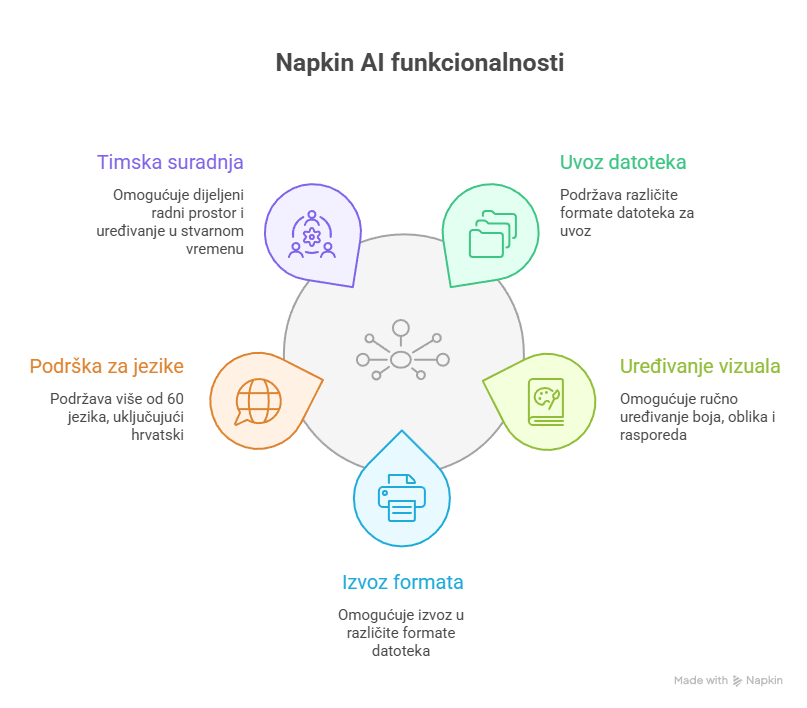
Napkin AI is based on simple text input that can be transformed into a visual with a single click. The tool allows importing files in PPT, DOC, PDF, HTML, and Markdown formats, as well as manual editing of all visual elements, including colors, shapes, and layout.
Generated visuals can be exported in PNG, PDF, PPT, and SVG formats. The tool supports more than 60 languages, including Croatian, with visuals automatically generated in the language of the input content. It also enables team collaboration through a shared workspace, real-time editing, and commenting.
Instructions for use
Rad s alatom odvija se u nekoliko jednostavnih koraka. Najprije je potrebno unijeti ili uvesti tekst u sučelje alata. Nakon toga, klikom na opciju za generiranje, alat predlaže više vizualnih prikaza između kojih korisnik može odabrati najprikladniji. Odabrani vizual zatim se može dodatno prilagoditi promjenom boja, oblika i rasporeda elemenata. Na kraju, vizual se može izvesti u željenom formatu ili podijeliti putem poveznice.
Terms of use
Napkin AI is available in a free plan with no time limit. The plan includes 500 AI credits per week. AI credits represent a measure of tool usage: they are consumed when generating visuals, with approximately one credit used per word of the selected text being converted into a visual. Consumption may vary depending on the complexity of the visual and the features used. In addition, the free plan allows unlimited editing of visuals, file import, and export in PNG and PDF formats. Paid plans start at $9 per user per month and include a higher number of credits, export to PPT and SVG formats, and the option to remove tool branding.
The tool is intended for users aged 13 and above. For student use, parental or guardian consent is required; therefore, it is recommended that teachers primarily use the tool to create educational materials.
Note:
The editorial team of the BrAIn project website does not provide support for the tools presented on these pages. The information and recommendations are based on external sources, and for more detailed information about the presented tools, users may contact their respective authors. Please note that CARNET is not responsible for any changes or updates to the presented tools or content after the date of publication. All information and functionalities of the tools are presented according to their status on the date of publication, and users use them at their own responsibility. Users are advised to ensure a high level of security for their devices and applications and to always review the terms of use of the tools before using them.